Chrome built-in AI
Notes from building on Chrome's built-in models — Gemini Nano, on the device, no API key.
Model tips
The summary-of-summaries technique
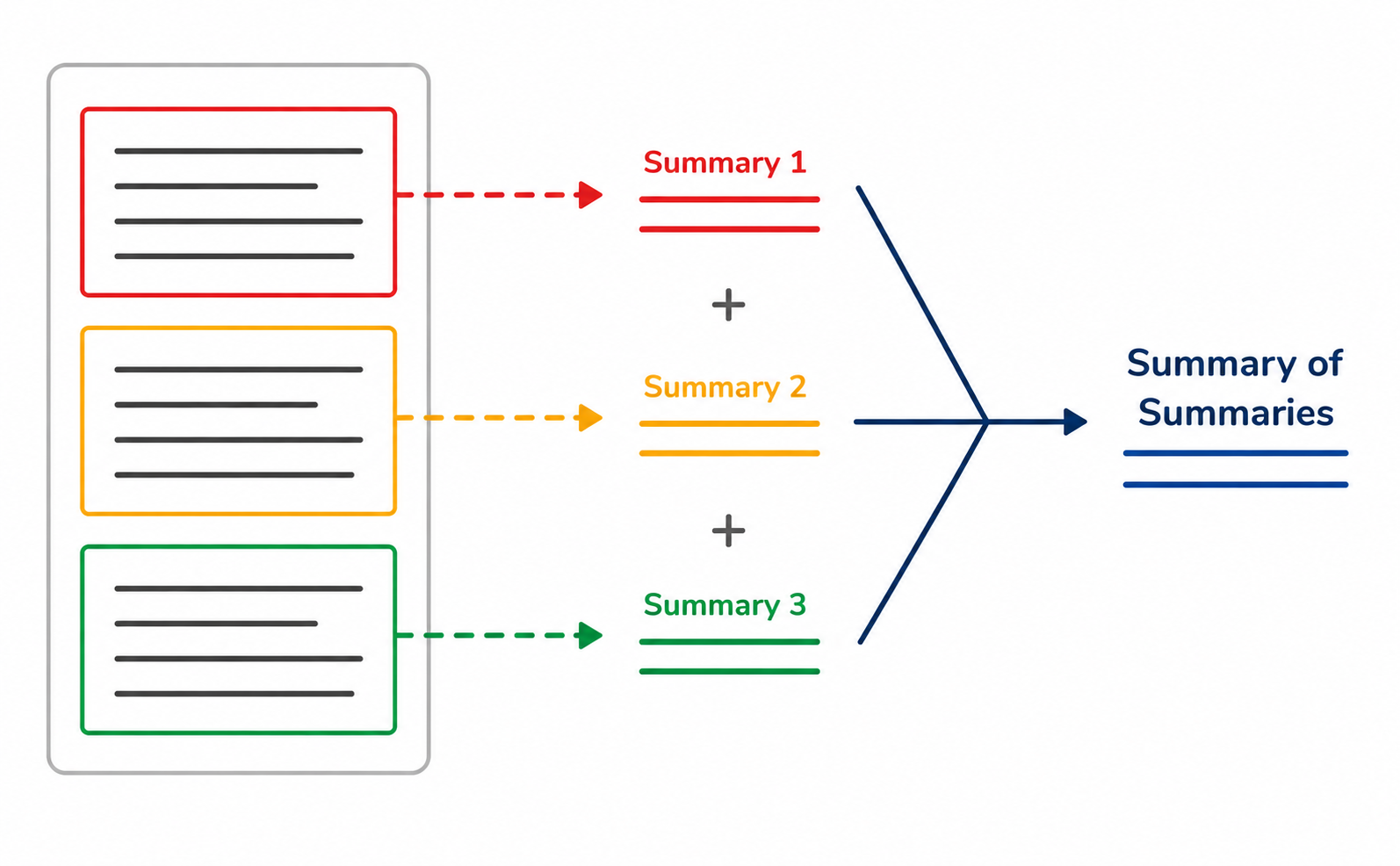
When the text runs past what the model can hold, split it into chunks and cut on natural boundaries — paragraphs or sections, not mid-sentence — because a chunk never sees the others. Then summarize each one on its own, and finally summarize the summaries together.
You can measure the size of your text with measureInputUsage(), and read the limit the device can hold with inputQuota.
Starting a session
Don't open an empty session and send your instructions later with the user's first prompt(). Give them to create() at the start — the session warms up on your time, not the user's.
const session = await LanguageModel.create(); // empty — nothing loaded yet
const review = await session.prompt('You are a code reviewer. Be terse. Review this code:' + code);
const session = await LanguageModel.create({
  initialPrompts: [{ role: 'system', content: 'You are a code reviewer. Be terse.' }],
});

const review = await session.prompt('Review this code:' + code);
Schemas don't do length
When you use a schema to fix the shape of the response, don't limit its length with something like maxLength: 125. It forces the model to squeeze the answer, so the output comes back with emoji and characters from other scripts. Wrap the output in a function and cut it there instead.
"summary": { "type": "string", "maxLength": 125 } // ✗ drop this
fitLength(answer.summary, 125) // length handled after the model answers
Clone, don't rebuild
Need a second session with the same rules? Don't call create() again — that pays the whole setup cost twice. clone() copies the session you already have, context and initial prompts included, so the branch starts ready. Only start a fresh session when the task is unrelated and the old context would get in the way.
// same rules, separate branch — no setup cost
const draft = await session.clone();
const shorter = await draft.prompt('Try a shorter version.');
Detect the language first
The Translator model needs (sourceLanguage, targetLanguage). If you don't know the source, detect it first using the LanguageDetector model.
const [best] = await detector.detect(text);   // source unknown

const translator = await Translator.create({
  sourceLanguage: best.detectedLanguage,
  targetLanguage: 'ar',
});

const translated = await translator.translate(text);
Don't trust a low score
Short text is hard to detect — a single word or a few characters isn't enough to tell languages apart. Check the confidence score, and treat a low one as unknown instead of guessing.
Start before the user asks
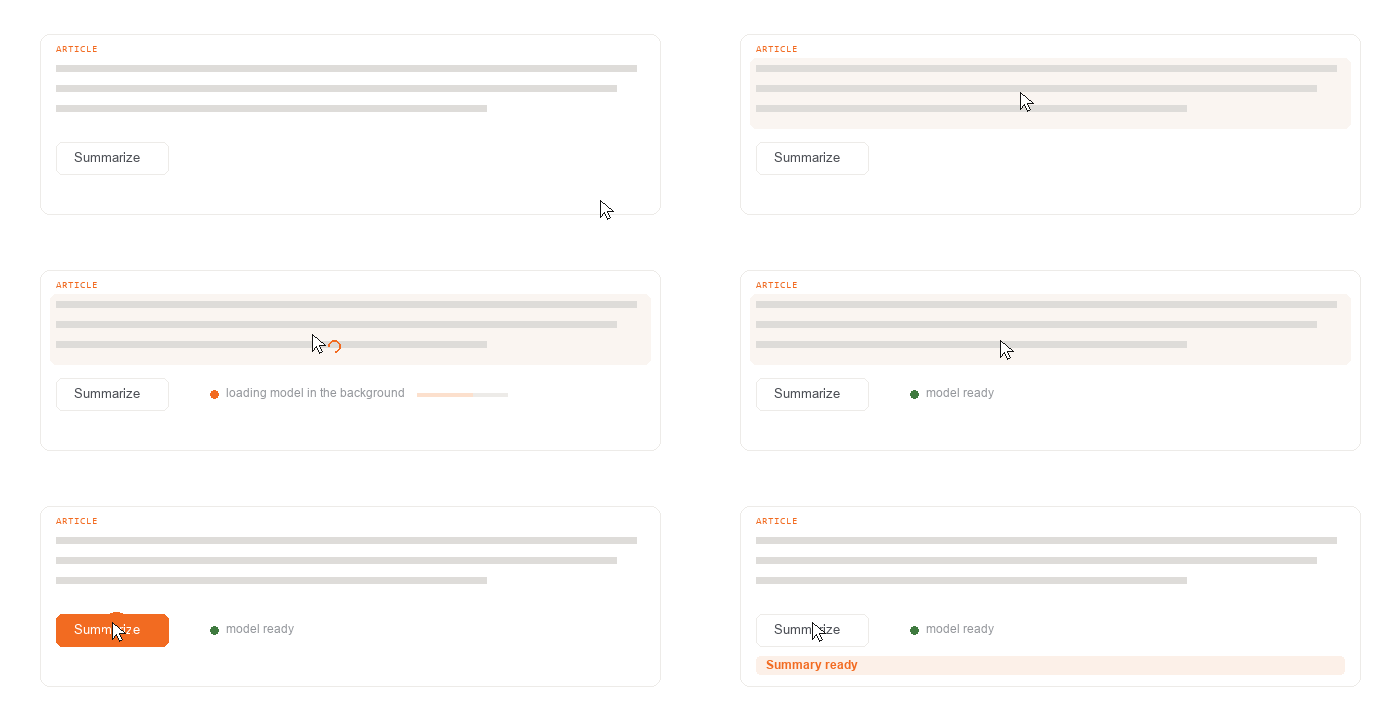
Start the session as soon as the user shows intent, not when they click Generate — the model loads in the background while they're still setting up, so the cold start is already paid for by the time they ask.
Keep the user informed UX
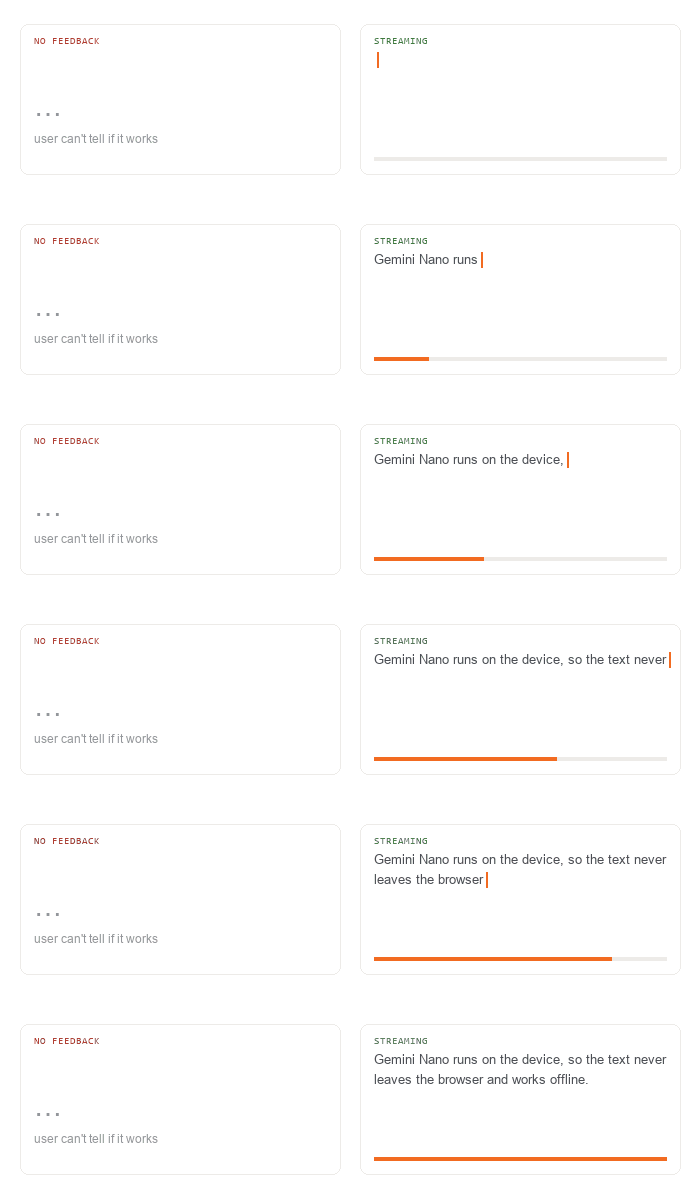
Show progress with animations or a progress bar — pick how much based on how long the task takes. For long output like summaries or chat, stream it: showing words as they arrive feels natural and gives instant feedback.
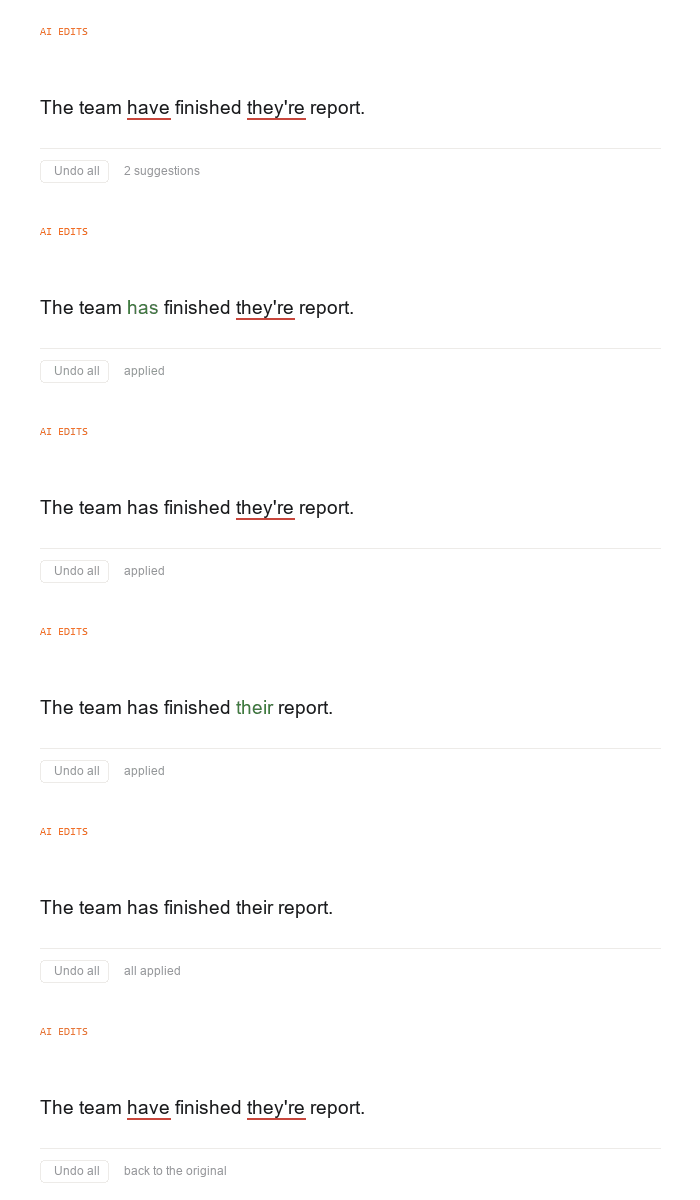
Allow users to quickly navigate and undo AI edits UI
Let people move quickly between the model's edits and revert any of them.
Cache repeated work
Keep a local result cache — sessionStorage or IndexedDB — for repeated inputs and queries, and normalize the input format first so the same request actually hits the cache.
Free the memory
Call destroy() explicitly on sessions you no longer need, so an idle feature isn't holding memory. With the clone pattern, keep the base session and drop the copies.
Ideas
Four things already shipped to real users, in the order the models appear below.
The editor that writes its own headlines
CyberAgent used LanguageModel to suggest titles, write the next paragraph, and rewrite a selected passage — all inside the Ameba Blog editor. Every feature is a button, not a prompt box. Asking for JSON was not enough on its own: they repair the model's answer before parsing it.
const session = await LanguageModel.create({
  initialPrompts: [{
    role: 'system',
    content: 'Create 3 titles suitable for the blog post content, ' +
             'within 128 characters, and respond in JSON array format.'
  }]
});

const titles = JSON.parse(repairJSON(await session.prompt(draft)));
Case study: Chrome for Developers
A thousand reviews, one paragraph
Miravia used Summarizer to condense the reviews on a product page, and to write a fresh summary whenever the shopper filters by rating. redBus used it the same way for each bus route. Miravia measured 12.4% higher conversion on product pages.
const summarizer = await Summarizer.create({
  type: 'tl;dr',
  length: 'short',
  sharedContext:
    'Summarize the given user reviews. Maintain a polite and formal tone.',
});

const summary = await summarizer.summarize(reviewContentList.join('. '));
Case study: Chrome for Developers
One summary, both ends of the newsroom
Terra used Summarizer inside the CMS, so a journalist summarizes the story in Portuguese and edits it before it goes out. Bright Sites used the same model at the other end — in the reader's browser at The Standard — where the summary still works with no connection.
const options = {
  sharedContext: 'Avoid jargon, use correct grammar, focus on clarity, and ' +
    'ensure the user can grasp the article purpose without needing to open ' +
    'the original content.',
  type: 'teaser',
  format: 'plain-text',
  length: 'long',
};

const summarizer = await Summarizer.create(options);
return await summarizer.summarize(text, { context: options.sharedContext });
Case study: Chrome for Developers
Answering in the language the question arrived in
Policybazaar used LanguageDetector to read the language a question arrived in and Translator to answer in it, and to translate articles on demand — about two seconds per thousand characters. JioHotstar used the same pair to fill in subtitles for titles that shipped without them.
const [best] = await detector.detect(message);

const translator = await Translator.create({
  sourceLanguage: best.detectedLanguage,
  targetLanguage,
});

const translatedMessage = await translator.translate(message);
Case study: Chrome for Developers
Setup & code
1 · Check availability
Two answers, each asking for something different.
unavailable— the device or the flags can't run it. Hide the feature and fall back.downloadable— supported, not on the device yet.create()starts the download, and it has to follow a click.
2 · Download
Creates the model and logs the download progress as a percentage.
3 · Use
Creates the selected model, runs it once, then releases it.